Summary
Syntax Sirens is an AI-powered accessibility checker that evaluates a website’s landing page against WCAG 2.2. Users submit a URL, and the system retrieves the live HTML, analyzes semantic structure and common accessibility risks, then returns findings with actionable recommendations written in plain language.
My Role
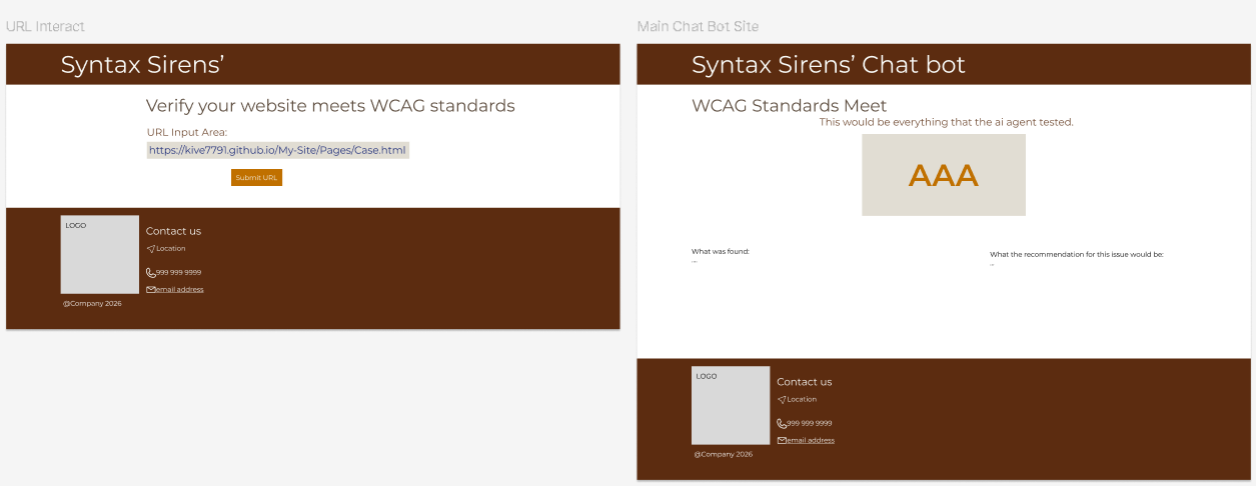
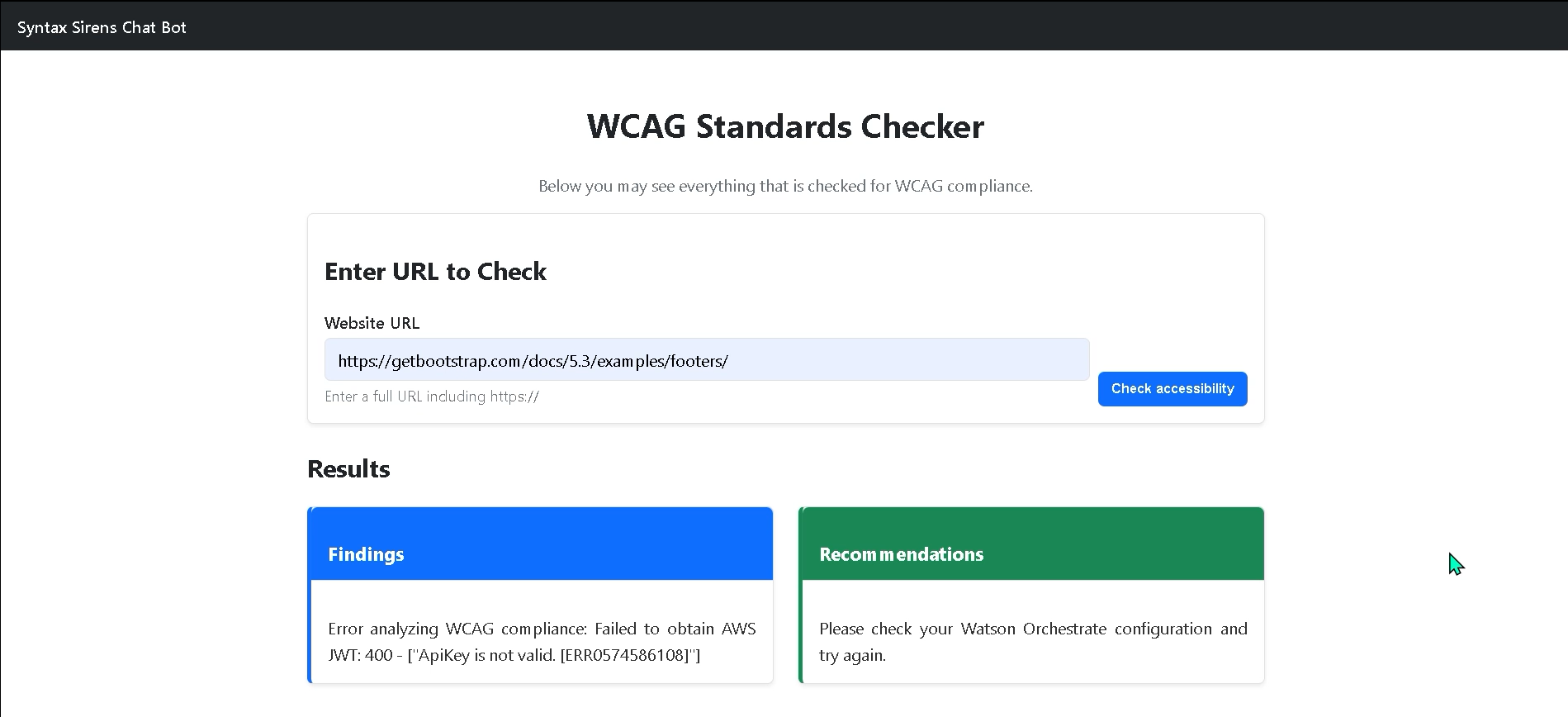
I owned the user-facing experience: UI design, frontend development, and connecting the interface to the backend services. I also co-produced the product demo video and edited the final cut for presentation.
Team collaboration: Francesca led AI agent development and integration support. Samuel led backend development.
The Challenge
Accessibility tools are often fragmented and overly technical. Our challenge was building a system that could evaluate accessibility quickly while presenting results in clear, actionable language for users without deep WCAG expertise. Working across time zones during a 48-hour hackathon, we rotated responsibilities and synced daily. My primary technical challenge was integrating the backend AI agent with the frontend, ensuring consistent data handling and reliable API communication.
Problem
Digital accessibility is often overlooked because WCAG guidance is complex and many existing tools are either fragmented across platforms or difficult to interpret leaving users unsure what’s wrong, why it matters, and how to fix it.
We designed Syntax Sirens for students, small businesses, non-technical site owners, and developers who want early feedback without needing deep WCAG expertise.
Solution
What it does
- Input: A public website URL
- Fetch: Live HTML from the landing page
- Analyze: Page structure and accessibility risks
- Map: Issues to WCAG 2.2 success criteria (A / AA / AAA)
- Explain: Findings in plain language + remediation guidance
What makes it different
Instead of only static rule-based scanning, an agentic AI evaluator reasons about the structure and intent of the page, explains why an issue matters, and provides actionable guidance making accessibility checks more understandable and educational.
Tech stack
- Backend: FastAPI (Python)
- AI: IBM watsonx Orchestrate (agentic workflow)
- Frontend: HTML + Bootstrap + JavaScript
- Outputs: Findings + WCAG mapping + recommendations
Agentic AI workflow
The core of the system is a WCAG Evaluation Agent orchestrated using IBM watsonx Orchestrate. Once triggered, the agent runs a multi-step evaluation flow autonomously.
Reasoning steps
- Input interpretation: receive raw HTML
- Contextual analysis: headings, links, images, forms, layout patterns
- WCAG mapping: connect issues to WCAG 2.2 criteria and level
- Severity classification: assess user impact and risk
- Explanation generation: plain-language findings + how-to-fix guidance
Why this matters
This approach turns accessibility auditing from a confusing checklist into an understandable, explainable experience. It encourages accessibility-first thinking and supports inclusive design earlier in the workflow.
Project artifacts
These artifacts document the full end-to-end build: UI design decisions, the agentic AI workflow, backend/API implementation, and an example of the output report.
- AI output example: AiAgentExample (sample agent findings + recommendations)
- Design source: Figma screens and interaction flow for the product UI
- Implementation source: GitHub repository (backend + frontend + setup docs)
- Demo video: product walkthrough showing URL submission → results
Links
Open the repo for setup + architecture details, view the design source in Figma, and watch the product demo.
Reflection
What I learned
This project strengthened my ability to design interfaces that translate complex system outputs into clear, user-centered guidance. I deepened my understanding of accessibility-first thinking and the importance of explainable AI, particularly when supporting users who may not be familiar with WCAG standards or technical terminology.
From an engineering perspective, I gained valuable experience integrating code across team members under tight time constraints. Working within a 48-hour hackathon required rapid iteration, clear communication, and practical decision-making. I also improved my ability to diagnose integration issues between frontend and backend systems, like when connecting our UI to the Watson agent services.
Perhaps most importantly, this experience reinforced the value of collaborative problem-solving. Even when integration challenges prevented full feature completion, we aligned as a team, identified next steps, and committed to continuing development beyond the hackathon. We plan to further refine the Watson agent integration and expand the product’s reporting capabilities.
Next improvements
- Expand beyond the landing page into multi-page crawl support (with safe scope controls)
- Add clearer “severity” visualization and prioritization for fixes
- Provide exportable reports (PDF/JSON) for sharing with teams
- Enhance UI accessibility (keyboard focus, reduced motion options)